
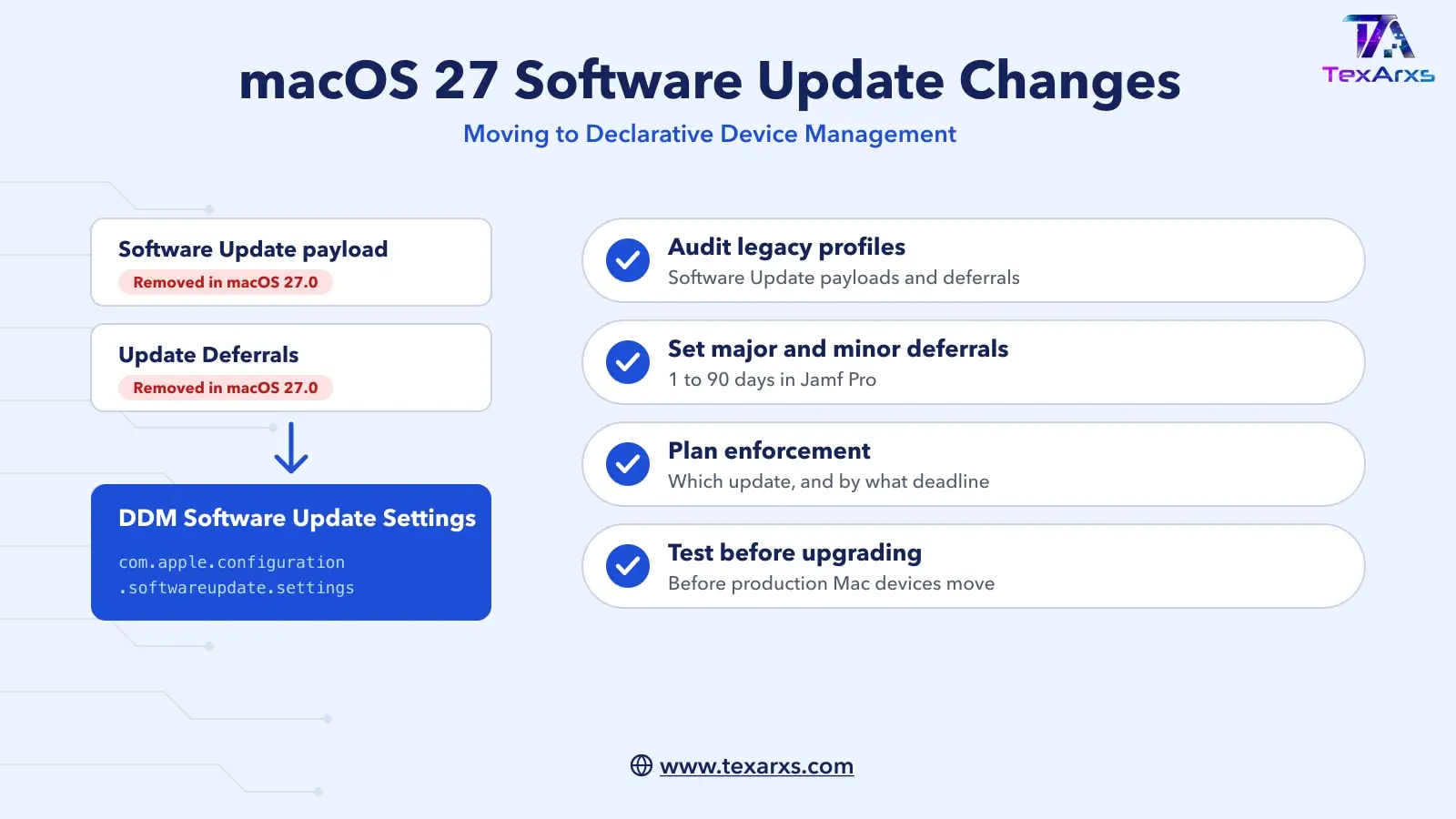
With macOS 27 approaching, Mac administrators should prepare for an important change: several familiar software update controls in traditional MDM configuration profiles are being removed. They are moving to the Software Update Settings configuration in Declarative Device Management (DDM).
If you manage Mac devices with Jamf Pro, you may already have noticed this warning against existing payloads:
“Removed in macOS 27.0”
This isn’t simply Apple relocating a few settings. It is the continued move of software update management from traditional MDM configuration profiles to DDM. It’s a good time to understand what is changing, where your existing settings may be configured, and how they map to the declarative approach. The examples here use Jamf Pro, but the same Apple configurations apply in any MDM solution that supports them.
Software Update Settings Are Moving Away from Legacy Profiles
Traditionally, software update behaviour on managed Mac devices could be configured using the Software Update payload in a configuration profile. Among other settings, administrators could configure automatic checks for updates, downloading updates and installing different categories of updates.
Jamf Pro now marks this Software Update payload as Removed in macOS 27.0.
Some individual options have already been deprecated for some time, including the ability to specify a custom Software Update Server. But another part of this change is particularly easy to overlook.
Don’t Forget About Update Deferrals
Software update configuration hasn’t historically lived in only one place. Many Mac administrators configure update deferrals through:
Configuration Profiles → Restrictions → Update Deferrals
These settings belong to the legacy com.apple.applicationaccess configuration and let administrators defer software updates for a set period. Jamf Pro now also marks Update Deferrals as Removed in macOS 27.0.
So when reviewing your environment for macOS 27 readiness, checking only profiles containing the Software Update payload isn’t enough. You should also find any Restrictions profiles where Update Deferrals have been configured.
In simplified form, software update controls have been spread across:
| Traditional configuration | Used for |
|---|---|
com.apple.SoftwareUpdate |
Software update behaviour and preferences |
com.apple.applicationaccess |
Restrictions, including update deferrals |
With macOS 27, these legacy approaches should no longer be the basis of your software update strategy.
Enter Declarative Device Management
Apple’s modern approach is the Software Update Settings DDM configuration:
com.apple.configuration.softwareupdate.settingsApple describes this configuration as a way to manage software update settings across its managed platforms. In Jamf Pro, DDM configurations are deployed through Blueprints, where Software Update Settings is available as a configuration.
This is an important architectural change. Instead of software update behaviour and deferral controls being scattered across traditional configuration profile payloads, the declarative Software Update Settings configuration is now the place to manage them.
Deferrals Are Now Part of Software Update Settings
Update deferral is one of the clearest examples. Within the DDM Software Update Settings configuration, Jamf Pro exposes Apple’s declarative deferral settings. For macOS, administrators can configure these separately:
- Major macOS update deferral (
MajorPeriodInDays): how many days a major macOS release can be deferred, for example macOS 26 → macOS 27. Jamf Pro allows a whole number from 1 to 90 days. - Minor macOS update deferral (
MinorPeriodInDays): the deferral period for minor macOS releases, for example macOS 26.0 → macOS 26.1.
The declaration also provides deferral controls for Apple’s other platforms. This gives administrators a more clearly structured software update policy, inside Apple’s declarative management model.
Deferral and Enforcement Are Not the Same Thing
Software Update Settings and software update enforcement solve different problems:
- Software Update Settings define the policy: how should software updates behave, and how long should a release be deferred?
- Software update enforcement answers a different question: which update must the device install, and by what deadline?
In practice, an organisation may use both. For example, you might defer a new major macOS release for a short validation period while your IT team tests business-critical applications. Once the release is approved, your enforcement strategy makes sure managed Mac devices move to the required release within your organisation’s compliance window. For more on enforcement, see our guide to Jamf Pro managed software updates.
What to Do Before macOS 27
Don’t wait until your first macOS 27 Mac devices arrive. Start by auditing your existing environment for both legacy locations:
- Configuration profiles containing the Software Update payload.
- Configuration profiles containing Restrictions → Update Deferrals.
Document what each setting is currently achieving, rather than trying to reproduce every checkbox in DDM. Then review the equivalent options under Blueprints → Software Update Settings (com.apple.configuration.softwareupdate.settings).
This is also a good opportunity to reconsider your overall update strategy:
- Do you still need the same deferral period you set several years ago?
- How quickly should security updates reach your fleet?
- How long do you really need to validate a major macOS release?
- After that validation period, how will you enforce adoption?
A migration is often a better opportunity to simplify policy than to recreate technical debt in a new management framework.
macOS 27 Is Another Step Towards DDM
Apple’s direction for device management has been clear for several years: more management capabilities are being delivered through Declarative Device Management. Software updates are one of the areas where that move is most visible. For the background, see Apple MDM: From Profiles to Declarative Management.
The macOS 27 change can be summarised like this:
| Before | macOS 27 and DDM |
|---|---|
com.apple.SoftwareUpdate plus com.apple.applicationaccess (Restrictions → Update Deferrals) |
com.apple.configuration.softwareupdate.settings |
The important takeaway isn’t simply that an old payload is disappearing. Software update settings that Mac admins have managed across several configuration profile payloads are moving into Apple’s declarative software update model.
With macOS 27 close, now is the right time to find those legacy configurations, understand what they do, test the DDM equivalents, and plan the move. Don’t discover the “Removed in macOS 27.0” warning after your production Mac devices have already upgraded.
Reference
- Apple Developer Documentation: SoftwareUpdateSettings
How TexArxs Can Help
We help organisations audit legacy profiles and move software update management to DDM, whichever MDM they use. See our Endpoint Management services or talk to us.